How it works
From a paper to a video, with you in charge of what it says.
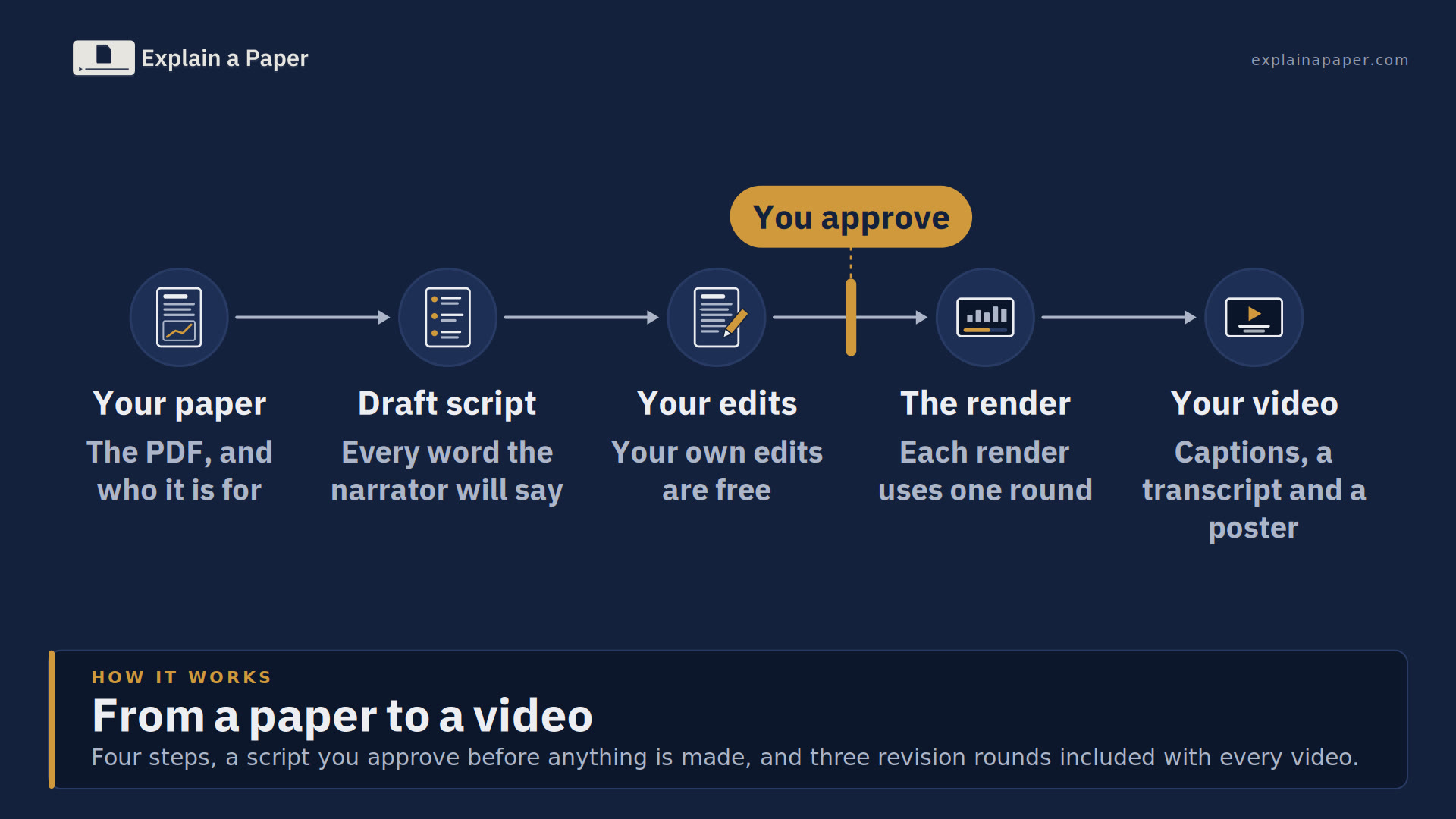
Four steps, a script you approve before anything is made, and 3 revision rounds included with every video.
Upload the paper
Upload a paper, or give us a web address: one page, or a whole website (how we read websites). Then tell us who the video is for, how long it should be (up to 5 minutes), whether you want a widescreen video, Shorts or both, what to emphasise and which voice to use. Choose a redrawn video, or one that shows the paper's own pages, which needs the right to adapt it (copyright and your video). Flag the paper if it is confidential or under embargo.
Read the draft script
Our specialised AI agents draft a script from the paper, written for your audience, and send it to you to read, edit and approve. You see every word the narrator will say, scene by scene.
Want a second pair of eyes? Add human review and one of our editors checks it against the paper and signs it off before it comes to you.
Edit it, then approve it
The script is yours to edit. You have full control: edit the narration, and say what you want to see at each point in the video. Your own edits are free. If you would rather we made a change, say what, and we send a revised script; that uses a revision round. Nothing is rendered until you approve it, and each render uses one round.
Get your video
A narrated video with captions, a transcript and a poster image. It is yours: download it and upload it wherever you like, such as YouTube, LinkedIn, your website, news pages or an intranet, and use it permanently. We can also upload it to YouTube or another platform for you.

Fast where it counts
The whole process, from paper upload to finished video, takes just a few minutes.
No booking in, no briefing call, and no waiting the one to three weeks that published video abstracts quote for a first cut that may still need another round of revisions. Your video arrives while the news is still news: ideal for press releases, embargo lifts, conference deadlines, funder reports and launches.
How we measure how long it takes
We time every order from the moment it is submitted to its first finished video, so the time you take to read and approve the script is included. The figure is the median (half of orders were ready sooner) and the 90th percentile (9 in 10 were ready within it) of the orders submitted in the last 30 days, recomputed every day. We leave out our own test orders, cancelled orders, orders put on hold, and orders still waiting for the customer to approve the script; an order still with us counts at its age so far. We show no figure until at least 20 orders have been measured.
Built, not generated
Generative AI video models paint every frame, so they can invent a number, a label or a result that sounds right but is not in the paper. We do not use them. Each frame is built from the paper's own words and data, so what the video shows can be checked against the source, line by line.
1,220 videos rendered, using an estimated 700 kWh and about 13–44 kg CO2e less than an AI video model would have, our own AI drafting included (our numbers).

No made-up facts
Our software draws only what is in the script you approve, and the script is written from the paper, with the page, table or figure behind each line noted so you can check it against the source.
Typeset, not painted
Every word on screen is typeset, so there is no garbled lettering and no text that is not in the script you approved.
Plotted from the paper
Charts are plotted from the paper's own numbers. In our pilot video of Hubble's 1929 paper, all 24 nebulae come from his Table 1.
Drawn deliberately
Diagrams are drawn in code to show what the script says, not generated to look plausible. What the video says is the script you approved.
Why AI video models get text, numbers and charts wrong, and how we keep videos true to the paper.
What you no longer have to do
An agency explainer usually takes you through five or six sign-offs: a brief, a script, a storyboard, style frames, rounds of animation and a final mix. Agencies' own published timelines for a 60 to 90 second animated explainer run from about 4 to 12 weeks, most often 6 to 8.1 Here is the same work, stage by stage.

| Stage | With a typical agency1 | With Explain a Paper |
|---|---|---|
| Briefing | A questionnaire and a kickoff call, often with an explanation of the paper for the writer | Upload the PDF and answer a short form: audience, length, voice, layout, what to emphasise, and your brand, imported free from your website or your logo |
| Understanding the paper | The writer learns the paper, often from you | Our specialised AI agents draft from the paper itself, and send the script to you. You still know the paper best: that is why you approve the script |
| Script | Drafts and usually two rounds of revisions | You read one script and approve it or ask for changes |
| Storyboard and style frames | A separate review and sign-off before animation starts | Nothing to review: the pictures are drawn in code from the script you approved, in our style or your brand |
| Voiceover | Casting and a recording session | Choose a voice from samples when you order |
| Animation | Usually two rounds of review on animation cuts | Watch the finished video, then accept it or ask for changes. 3 revision rounds are included |
| Your sign-offs | Five or six | Two: the script and the video |
Your time. We estimate about 10 to 20 minutes to read and approve a script, and about 20 to 45 minutes in all for a video with one round of changes. That is an estimate from our pilot videos, not a measurement; we will replace it with measured figures from real orders.
1 Sources: the published process pages of Yum Yum Videos (May 2026, 6 to 8 weeks), Hocus Pocus Studio (6 to 8 weeks), Gisteo (Mar 2026, 2 to 6 weeks), Epipheo (8 weeks), Mooviemakers (Jul 2026, 4 to 8 weeks), Breadnbeyond (Aug 2026, 5 to 7 weeks) and Demo Duck (8 to 12 weeks), read 27 September 2026. These are the studios' own figures. Timelines vary with length, style and how quickly the client replies.
Revisions included
A revision round is one complete render of your video. Each video includes 3, and the first render uses one. Your own script edits are free; asking us to rework the script uses a round. Fixing our own mistakes never uses one.
Need more? An extra round is £19 (£22.80 inc. VAT).
Always know whose turn it is
Your dashboard shows where each video is, whether it is with us or waiting for you, and what happens next. We email you when a script or a video is ready.
We will confirm timing when we send your script, and we take on only as many videos as we can deliver.

What you get
A video people finish
Short and clear, written for the audience you chose, with diagrams and labels that stay legible because they are built, not generated.
Accessible from the start
Captions and a full transcript with every video, so it works with the sound off and with a screen reader. Captions and voiceovers in other languages are on our roadmap.
Your choice of voice and layout
Choose the narration voice (hear each one before you choose) and the layout: slides, full animation, a mix, or your own slide design, uploaded from a template we provide and checked by our team.
An honest, synthetic narrator
Choose from 28 high-quality synthetic voices in English: British and American, women and men, with different pitches and paces, each one playable on the order form. They run efficiently on our own machines, and every video says its narrator is synthetic. The script is drafted by our specialised AI agents.
Optional extras
- Stills for your website (£4.99 per video, plus VAT): up to 10 still images from your video, at full size and as smaller web images, with alt text suggestions.
- Slides (PowerPoint) (£4.99 per video, plus VAT): a PowerPoint of your video's scenes, with each element as a separate piece you can move and edit, and the narration as speaker notes.
Tick them when you order, or add them from your video's page once it is ready. The Enterprise subscription includes still images and slides for every video.
Before you order
The order form asks for these. Have them to hand before you start, and you can save a draft at any point and come back to it.
- Your paper as a PDF. Up to 25 MB and not password-protected. Remove anything that could identify the people in your study first.
- Who the video is for. The general public, policymakers, students or specialists in the field.
- How long it should be. A target of 1, 2, 3 or 5 minutes. The video runs no longer than the length you choose.
- A widescreen video, Shorts or both. One widescreen video, a set of 3 vertical Shorts for social media, or both.
- What to emphasise. Optional: the finding, the number or the message that matters most to you.
- The layout and the voice. Slides, full animation, a mix or your own slide design, and a narration voice, which you can listen to first.
- What the video can show from your paper. Redrawn in our own words and drawings, or showing the paper's own pages and figures. For a video that shows the paper, how you hold the right to adapt it: for example you kept the copyright, the publisher has given permission, or the paper is under a CC BY licence.
- Whether it is confidential or under embargo. And, for an embargo, the date it lifts.
- Your brand. If you want the video in your own brand: your logos, colours and fonts, or your website's address for us to take them from.
- Who is paying. Your own account or your team's. If the account has no video credits left, you can pay for the video by card when you submit it.
Any length up to 5 minutes for the price of a one-minute video, and Shorts at no extra charge. We may charge for longer videos and Shorts in future. We'll tell you before we do, and it won't affect videos you've already ordered.
Need a longer video, or one covering several papers? Contact us about 30 or 60 minute videos, or a video spanning several papers, such as a research archive. Not sure what your paper allows? Copyright and your video explains it.